Is an audio baby monitor enough?
You might expect a winner here. We don’t have one: we found no research showing that audio or video is better. So we look at your situation first, and then at how it works in our own baby monitor app with a live picture.
What suits which situation?
| Your situation | What often fits |
|---|---|
| You mainly want to wake up when your child cries, and you would go and look anyway | Sound is enough |
| Your child makes lots of noises while asleep, and you want to know whether to get up | A picture helps |
| The baby’s room is far away, say two flights of stairs up | A picture can save a trip |
| You want the unit in the room to transmit as little as possible | Sound, on a unit with voice activation |
| A camera in the bedroom doesn’t feel right | Sound |
| You want to see something in a pitch-dark room | A camera with infrared |
What are the pros and cons of a video monitor?
With a camera you can see whether your baby is asleep or sitting up in the cot (crib). That can save a trip to the room, and with it the chance of waking your child. You can also see what an unfamiliar sound was.
There are a few things on the other side.
- The unit transmits more. According to the Belgian health agency, monitors with video transmit a signal all the time, while most audio systems only transmit when they hear sound. For more on that, read baby monitor radiation.
- There is more to secure. For cameras and baby monitors, the UK’s National Cyber Security Centre advises, among other things, changing a default password, installing updates and turning off viewing over the internet if you don’t use it. The full list is in can baby monitors be hacked.
- A screen pulls you in. With sound, you know as soon as something happens. A picture invites you to keep looking, even when nothing is going on.
Is an audio baby monitor enough?
Often, yes. With sound there is nothing to look at: you hear it with your phone on the nightstand or your earbuds in. It keeps working when your child lies in a corner of the cot a camera can’t see.
What you miss is the meaning. A groan could be anything, and then you go and look anyway. That is fine, as a monitor never replaces adult supervision. Your need also changes with time: when to stop using a baby monitor goes through it stage by stage.
How does the picture work in NightEar?
With NightEar you don’t have to choose up front. The baby phone always sends sound, and a picture is added when a parent asks for it. You tap Watch on the parent phone and see the room live, at about 6 pictures per second. When an alarm for sound or crying comes in, Watch is right there on the alarm screen. This works on iPhone and Android, in any mix.
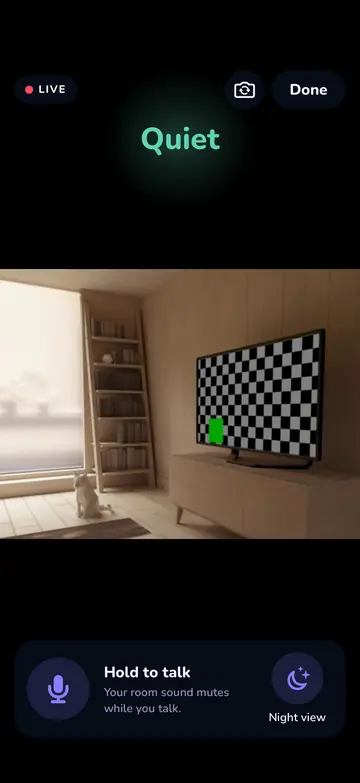
Watch has these limits:
- The app must be open on the baby phone. The camera only runs while NightEar is on that phone’s screen. Lock the baby phone or switch to another app and the picture stops. Listening and alarms carry on.
- Two watchers at a time. Four phones can listen along, and two can watch.
- A pause after 3 minutes. This spares the baby phone’s battery. Tap Keep watching to go on.
- Too warm means no picture. If the baby phone gets too warm, the camera stops. Listening carries on.
- Slow Wi-Fi: sound comes first. If your Wi-Fi is too slow for a smooth picture, the app says so and the sound keeps priority.
- Nothing is kept. Watch is a look at the room. NightEar records nothing and takes no photos.
- At home only. Picture and sound stay on your own Wi-Fi, so you can’t watch from outside your home.
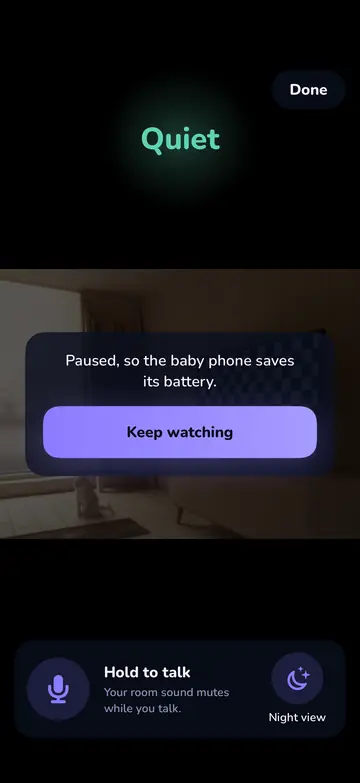
Everything about Watch, along with the other screens, is on the features page. If no picture appears, see help with Watch.
Can you see in the dark with NightEar?
A little. Night view brightens a dark picture on your own screen. It is not infrared and no light goes on, so nothing changes in the baby’s room. In a very dark room there is little to see, and then you have the sound and the alarms.
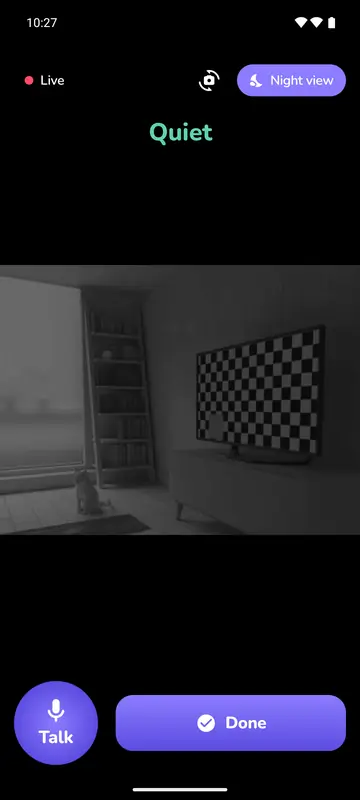
A small night light helps the camera. The back camera also sees more in low light than the front one. You switch cameras on the baby phone, or while watching with the camera icon on the parent phone. If a picture in the dark decides it for you, a separate camera monitor with infrared is the better fit.
Where do you put the camera?
Place the baby phone in a fixed spot, at least 1 metre from the cot, and point the camera at the cot. Leave NightEar open on the black night screen, on the charger, with the cable out of your child’s reach. The Get ready list shows you what the parent phone will see.
Would you rather have no picture at all?
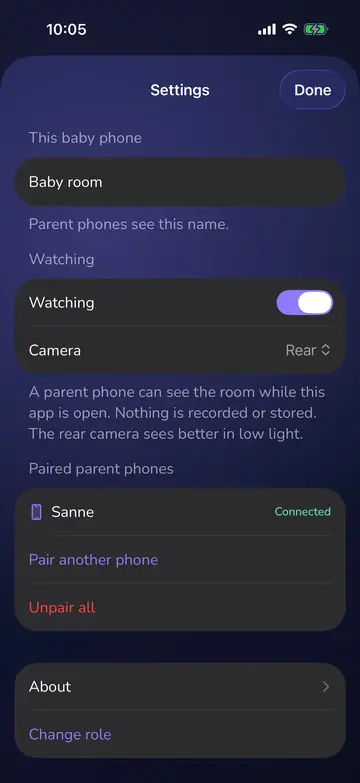
You can do that. Watching is a switch on the baby phone, in Settings. Turn it off and NightEar works as a sound-only monitor. The parent phone then says Watching is off. And when someone is watching, the baby phone shows you who.
Common questions
Is a video monitor better than an audio one?
Neither is always better, and we found no research that shows one is. Sound is enough if you mainly want to hear that your child is awake. A picture helps if you want to see what a sound means before you get up.
How long does the picture stay on in NightEar?
After 3 minutes the picture pauses to spare the baby phone’s battery. One tap and you go on, as often as you like.
Can both of us watch at the same time?
Yes, two parents can watch at once. A third waits until someone stops. Four phones can listen along.
Is the picture saved?
No. NightEar records neither picture nor sound. It goes directly and encrypted from the baby phone to your own paired phones, over your own Wi-Fi.
Sources
- Federal Public Service Health (Belgium), Infofiche draadloze apparaten, in Dutch, undated, file name from November 2025.
- National Cyber Security Centre (UK), Smart security cameras: using them safely in your home, 3 March 2020.
NightEar is not a medical device and does not replace adult supervision.